What I Let AI Agents Do on My Homelab, and What I Kept for Myself
One bot, four local agents, and Codex got my Proxmox homelab to apply-on-merge in a day. I kept the secrets, the sudo steps, and the merge.
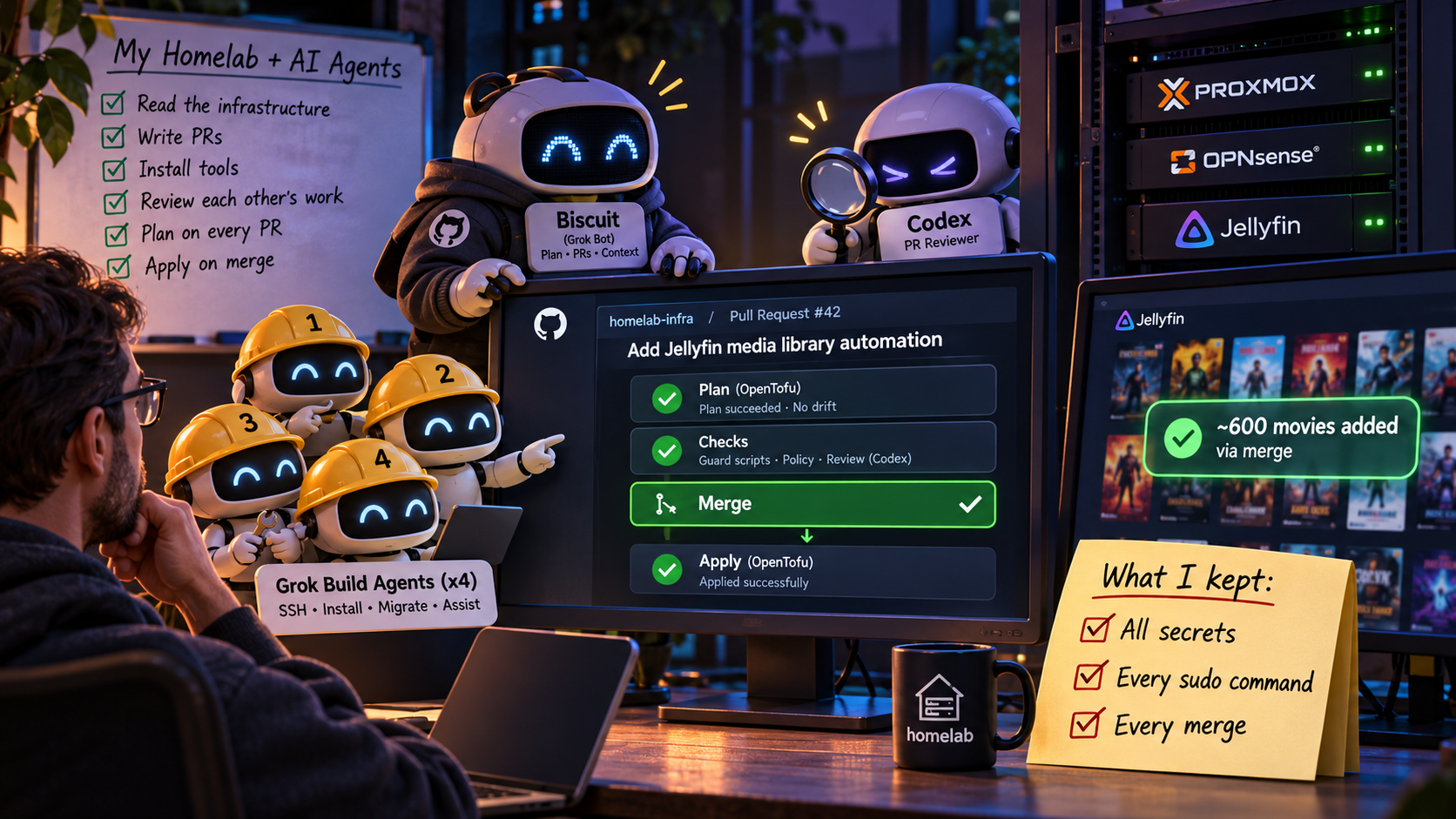
The setup
This is the write-up I promised a few of you: what we built, how I split the work between agents, and where I stayed in the loop. The hardware is pretty boring:
- A Proxmox host. It owns the ZFS pool and runs two family containers, one for SMB shares and one for Jellyfin.
- An HP EliteDesk on Ubuntu. It’s the self-hosted GitHub Actions runner, and it ends up being a Tailscale subnet router too.
- OPNsense for routing, DHCP, and DNS.
Everything lives in a private repo. Proxmox is described in OpenTofu, with encrypted state in Cloudflare R2, plus docs, runbooks, and a pile of guard scripts. Before this week I was the one applying changes from my Mac, and I was also the bottleneck.
The cast:
- My Grok Bot assistant (Biscuit). It runs on its own remote box and holds the long-running context: the repo, the issues, the PR history, and why we made each decision. It opens PRs as its own GitHub App bot, so nothing lands under my name, and it can read Proxmox through a read-only token.
- Four Grok Build agents on my Mac. These did the hands-on work: SSH sessions, installing tools on the runner, migrating users, and walking me through commands I could paste.
- Codex, which reviews PRs when I comment
@codex review. - Me. I run anything that needs
sudo, I handle every secret, and I merge.
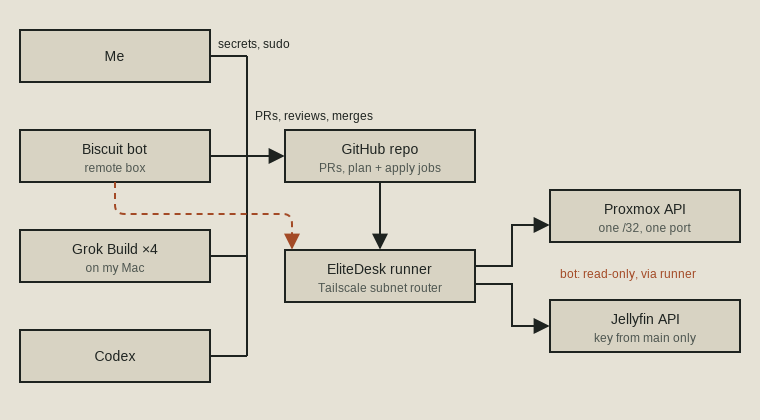
That last item matters more than it sounds.
Eyes without hands
The assistant can’t verify much if it can’t see anything. I wanted it to read Proxmox without being able to change it, and I wanted that enforced on the Proxmox side, not by trusting the client.
On Proxmox, the bot has a user with no password, so it can’t log in to the GUI. It gets one privilege-separated token with the audit-only role. A Grok Build agent and I created it in a local terminal so the secret never passed through any chat. The client on the bot’s side only sends GETs to an allowlist of paths, but that’s a convenience. The token is the real control.
The network side was the interesting part. I didn’t want to route my LAN to the bot, and I definitely didn’t want an agent installed on the hypervisor. So the EliteDesk became a Tailscale subnet router that advertises exactly one /32, the Proxmox host, and the bot’s node can open only the Proxmox API port on it.
One good catch came here. My tailnet policy had an old allow-all grant with source *. In Tailscale, * includes tagged nodes. So the moment I tagged the bot’s machine, it would have inherited my entire tailnet, and all my careful /32 work would have meant nothing. Changing that grant from * to autogroup:member closed it. If you have an old default ACL lying around, go check it.
I also made my own mistakes there. The first auth key I made wasn’t tagged, so the bot’s machine joined as one of my devices, with all my access. Then, while fixing that, I put the bot’s tag on the EliteDesk instead of the bot’s node. Biscuit noticed the router suddenly carrying its tag and flagged it before anything relied on it.
After the policy change landed, Biscuit tested it instead of trusting it. Only the API port answers now, and SSH and the proxy port time out. “I wrote the rule” and “I tested the rule” are different claims. The whole thing went into the repo as a documented, reviewed exception: one host, one port, read-only, and anything wider needs its own review.
Plan on every PR, apply as someone else
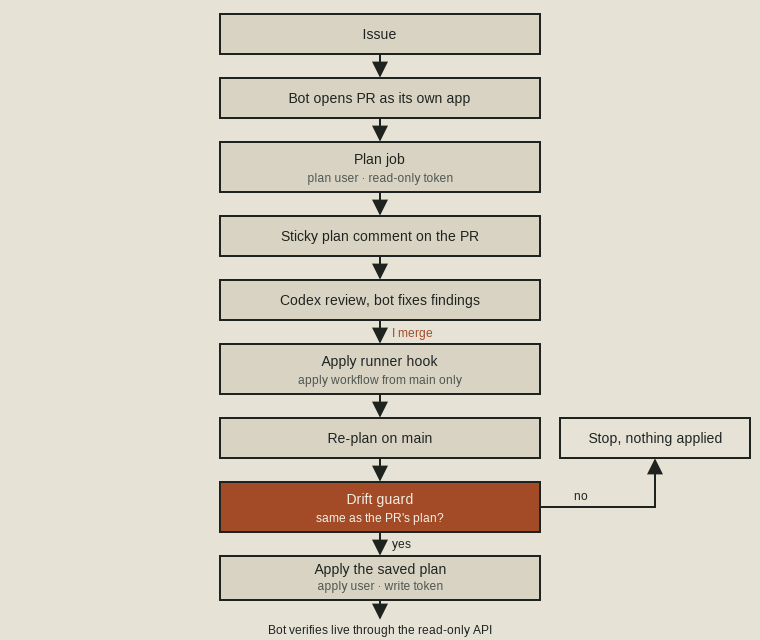
Next the bot added plan-on-PR and apply-on-merge for the Proxmox stack, with a drift guard. Every PR runs an OpenTofu plan on the EliteDesk and posts a sticky comment. On merge, the apply job re-plans, checks that the plan matches what the PR showed, and only then applies that saved plan. The idea is that merging is the approval. There’s no separate “now go apply it” step.
Then I tried to give the apply a write identity, and the first thing we found was a little embarrassing. The plan runner was named for the homelab, but the systemd unit ran it as my Unix user, and my user is in sudo. So any PR’s plan job was effectively running as an account that could sudo. A 0700 directory wouldn’t have hidden a write token from that. The setup guide had assumed a dedicated user that didn’t exist.
What we built instead:
| Job | Runs as | GitHub runner | Proxmox token |
|---|---|---|---|
| Plan | a dedicated non-sudo user | org-level runner | audit role, read-only |
| Apply | a different non-sudo user | repo-level runner with its own label | write role |
Each user has its own group and a 0700 home, and neither can read the other’s files. I checked that from both sides. The apply role can create and configure guests, power them, and use storage and SDN. It has no console and can’t change users or permissions.
Labels aren’t a security boundary, though. Anyone who can edit a workflow can point a job at that runner with one runs-on line. So the apply runner has a root-owned job-started hook that refuses everything except the apply workflow, from main, started by a push or a manual run.
The migration to the new users is where the real-world mess showed up. A Grok Build agent wrote a script to move the existing runner to the new user, and it rolled itself back over a race. systemctl reported the service active as soon as the launcher script started, but the listener process shows up about a second later. The script checked too early, decided it had failed, and put the unit file back to my user, while the new process kept running and stayed connected to GitHub. The fix was to restore the unit by hand, reload systemd without restarting, and delete the backup unit so a later rollback couldn’t bring back the old path.
The AI reviewer found a real hole
The PR with the runner split and the hook went green. I asked Codex to review it before merging, and it came back with a P1: a failing job-started hook doesn’t stop the job. It marks the job as failed, but later steps with if: always() still run. So a PR could point a job at the apply runner, let the hook refuse it, and still run an always() step as the apply user and read the write token. All before anyone merged anything.
The bot checked this against the runner’s source code instead of taking Codex’s word for it, and Codex was right. The fix: when the hook refuses a job, it kills its parent Runner.Worker process. The hook runs before any workflow step or action, so nothing from the PR gets to execute. The listener stays up and takes the next job. Offline tests cover both cases, a refused job stops before the next step and an accepted job continues.
Two things I want to call out:
- The repo file is not the live file. The runner uses a root-owned copy of the hook outside the repo. A Grok Build agent found that the live copy was still the old 14-line “print and exit 1” version, and as my normal user without passwordless
sudoit couldn’t replace it. It staged the new file, I checked the hash against the repo, and I ran thesudo installmyself. - We tested it live. The bot pushed a throwaway branch with a job aimed at the apply runner and one harmless
if: always()echo step. The job landed on the apply runner and failed one second after it started. GitHub showed no steps at all, the echo never ran, and there was no job log, which is what you’d expect when the worker dies mid-job. The runner went back to idle, and the bot deleted the branch.
I would not have caught that hole myself. I had read the hook and it looked fine. A second AI with a different perspective found it, and a live test proved the fix worked. I’m now relying on that combination.
The first real apply, and the posters
With the hook fix merged and the live copy updated, I re-ran the plan on a small PR that set both containers to start on boot, and merged it. The bot checked the run afterward:
- Both jobs ran on the apply runner, and the hook logged
acceptedfor the apply workflow onmain. - The drift guard passed, so the post-merge plan matched the PR’s plan.
- The apply changed 2 resources and added or destroyed nothing. The follow-up plan showed no changes.
- Through its read-only token, the bot confirmed both containers were set to start on boot and running.
Then the poster problem. Jellyfin had no artwork. The repo had deliberately turned off every internet metadata source, and the artwork files weren’t next to the media. The fix was to let Jellyfin fetch from TMDb. Any internet-facing change in this repo needs my explicit decision, so I made the call. The traffic only goes outbound from the container. Nothing becomes reachable from the internet.
The bot’s first plan was “change the policy, then you run the setup script on the host as root.” I pushed back, because the whole point of this was for me to stop running things. So the apply workflow configures Jellyfin through Jellyfin’s own HTTP API. The job prints a diff of the library settings, writes only the settings the repo owns, reads them back to confirm they stuck, and queues a search for missing artwork. The bot checked the API calls against the source of the Jellyfin version the container actually runs, rather than guessing.
I asked whether the API key had to live on the runner like the Proxmox token. The answer was a GitHub environment secret. The production environment only allows main, so only jobs running from main that name that environment get the key. PR jobs never see it, even on the same runner. I created the key in Jellyfin and added it to GitHub myself. Codex reviewed it with no findings, and I merged.
The diff turned TMDb on for both libraries: 5 changes for Movies and 13 for TV Shows. Posters started showing up a few minutes later.
How the split actually worked
- The bot holds the context. Four Grok Build sessions on my Mac each knew their own slice. The bot knew all of it. When I came back from a local session with a report, it checked that report against the PR, and usually the answer was “no change needed” or “one docs commit.”
- Grok Build has the hands. Installing tools, migrating systemd units, staging the hook, and checking permissions from both sides all happened in local sessions where I could watch, paste, and type passwords.
- I’m the boundary. Every secret was created in a local terminal or typed into GitHub by me, and none of them ever went through a chat. Every
sudostep was mine, partly by design and partly becausesudoon the runner refused anything without a real TTY. Every merge was mine. Merging is the apply, so that click is the approval. - Reviews and live checks beat confidence. Codex found the
always()hole. The bot checked Codex against the runner’s source. The refusal test and the bot’s read-only checks confirmed what actually happened, not what we expected.
The agents got things wrong, and that’s fine as long as the system catches it. The design assumes mistakes like these will happen.
Lessons learned
*in a Tailscale grant includes tagged nodes. Check your default ACL before you tag anything you don’t fully trust.- Runner labels are routing, not security. If a runner holds a credential, something on the host has to refuse jobs, and refusing means killing the job, not just failing it.
- The repo copy is not the deployed copy. Anything root-owned on a host needs an explicit install step and a hash check.
- “Service active” doesn’t mean “process ready.” Wait for the thing you actually care about.
- Make the merge the approval, then make it safe to be the approval. That takes a plan on the PR, a drift guard after the merge, and a separate identity that only
maincan use. - Ask an AI to review the AI’s work, then test it live. Both steps found things the other wouldn’t have.
What’s next
- Make the EliteDesk rebuildable from the repo. The runner holds a lot of hand-built state right now: two Unix users, tool installs, the hook, and on-disk tokens. Losing that box should cost an hour, not a weekend.
- Probably remove the bot’s GitHub App permission to edit workflows. Then the realistic way to point a job at the apply runner goes away entirely, and workflow changes come from me.
- Why I did it this way. This post is about what we built and what broke. It’s already long, so I’m leaving out why I set it up like this. I’ll post a short write-up about that on X, so follow me there.
By the end of the day I was mostly reviewing, deciding, and clicking merge. That’s the job I want in my own homelab.